stough 202-
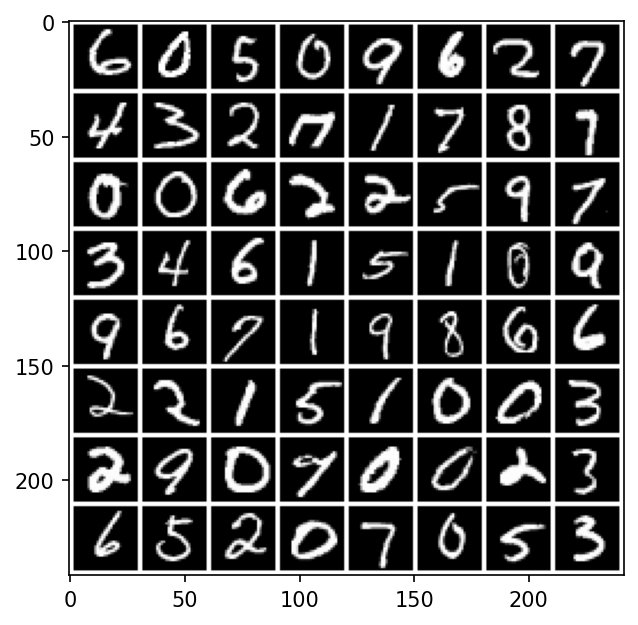
The MNIST database is one of the first large machine learning datasets, originally designed for the computer vision task of recognizing digits on bank checks. It consists of some {60000 training, 10000 test} 28x28 grayscale images of handwritten digits, along with each image’s associated decimal digit represented.
PyTorch is open source machine learning library principally developed by Facebook. It enables us to perform very advanced GPU-based machine learning through a convenient Python interface.
We will here explore the MNIST dataset through PyTorch.
%matplotlib inline
import matplotlib.pyplot as plt
import numpy as np
import numpy.random as random

import torch
from torch.utils.data import (Dataset,
                              DataLoader)
import torchvision.datasets as datasets
import torchvision.transforms
from torchvision.transforms import ToTensor
from torchvision.utils import make_grid

# For importing from alternative directory sources
import sys
sys.path.insert(0, '../dip_utils')
from data_paths import mnist_root
Download the training and test Datasets
Torch allows us to interface with our data through DataLoader and Dataset objects. torchvision knows how to fetch MNIST, and with download=True it downloads the data into your data folder (see data_paths) the first time, then reuses it.
# Thank you: https://www.aiworkbox.com/lessons/load-mnist-dataset-from-pytorch-torchvision
# https://pytorch.org/vision/stable/datasets.html
mnist_trainset = datasets.MNIST(root=mnist_root(), train=True, download=True, transform=None, target_transform=None)
mnist_testset = datasets.MNIST(root=mnist_root(), train=False, download=True, transform=None, target_transform=None)mnist_trainsetmnist_trainset[10000]mnist_trainset[10000][0]Indexing a Dataset gives one example: a tuple of the image (here a PIL image, which the notebook displays directly) and its label, an integer from 0 to 9. Before torch can compute with the images, they need to be tensors. ToTensor converts a PIL image to a float tensor scaled to , with shape : channels first, then rows and columns.
to_tensor = ToTensor()samples = torch.stack([to_tensor(mnist_trainset[r][0])
for r in np.random.choice(len(mnist_trainset), 64, replace=False)])
plt.imshow(make_grid(samples, nrow=8, pad_value=1.0).permute(1,2,0))Expected output (what the cell above should show, if you can’t run it)
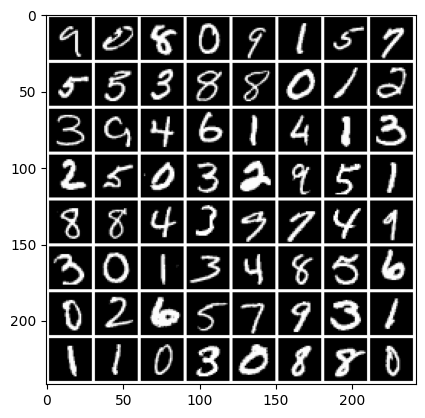
make_grid tiles a batch of images into one big image, and the permute reorders it from torch’s (channels, height, width) to the (height, width, channels) that matplotlib expects (see the note below). Run the cell a few times to see different random samples. Notice the variety in handwriting: thick and thin strokes, slants, open and closed loops.
Let’s look at all training sevens.
We do the permute because torch is channels-first, meaning each image is actually (1,28,28).
If our images were color, the default orientation would be (3,h,w). This orientation is
incompatible with matplotlib’s imshow.
samples = torch.stack([to_tensor(mnist_trainset[r][0])
                       for r in range(len(mnist_trainset))
                       if mnist_trainset[r][1]==7])
plt.figure(figsize=(10,30))
plt.imshow(make_grid(samples, nrow=70, pad_value=1.0).permute(1,2,0))
plt.tight_layout()samples = samples.numpy().squeeze()samples.shapeplt.imshow(np.sum(samples, axis=0))
plt.title(f'Sum of all {len(samples)} training sevens');Expected output (what the cell above should show, if you can’t run it)
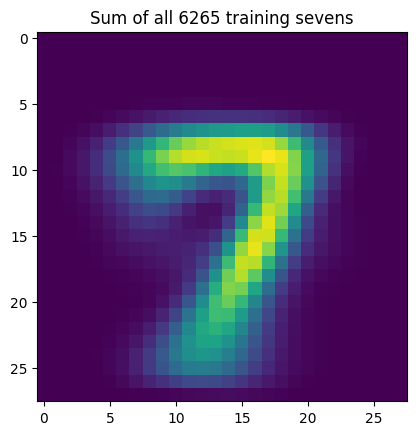
Summing every seven in the training set gives a kind of “average seven”: brightest where most sevens have ink, the crossbar at the top and the stroke down the middle, and fading out where only some sevens reach. The blur shows how much the sevens vary in slant and position. Even so, they are roughly centered and scaled the same way. The MNIST creators normalized every digit to fit a box centered in the image, which makes the recognition task much easier.
Next, can we recognize digits automatically? Try a first approach yourself in the template-matching activity, then see what a learned linear classifier does.