stough 202-
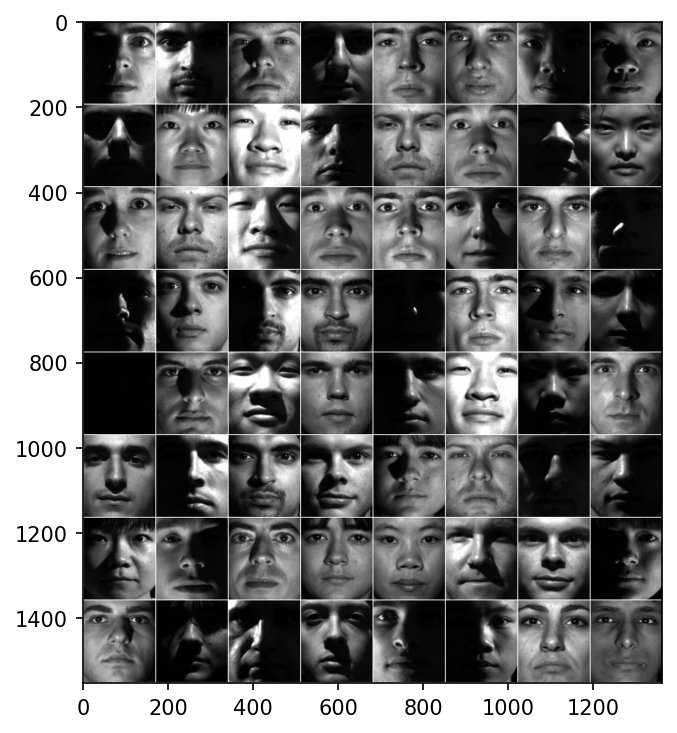
Here I’m exploring a part of the Yale Extended Face Dataset B. This CroppedYale dataset consists of ~65 cropped face images for each of 38 individuals. The images are taken under different lighting conditions, but the face orientation stays the same.
The dataset is organized in a very convenient way for PyTorch, as a root directory each of whose subdirectories represents a class and contains the images of that class. This is ideal for torch’s ImageFolder Dataset.
%matplotlib inline
# or widget
import matplotlib.pyplot as plt

import numpy as np
from random import shuffle
import os


# from keras.datasets import mnist
from torchvision import transforms
from torch.utils.data import Dataset, DataLoader
from torchvision.utils import make_grid

from torchvision.datasets import ImageFolder
import torch

# For timing.
import time
tic, toc = (time.time, time.time)

# For importing from alternative directory sources
import sys
sys.path.insert(0, '../dip_utils')
from data_paths import yale_root, yale_ext_root
Let’s start by just getting the data, seeing what it is.
As a Dataset, it’s indexable with __getitem__. Indexing the Dataset shows it gives you a tuple. This is the input, target tuple that you can train for. Further, the .classes and .class_to_idx show the folder names corresponding to the target index in the tuples.
yaleData = ImageFolder(yale_root())
yaleDatayaleData[1000]yaleData.class_to_idxEach item is a (PIL image, label) pair, where the label is the index of the person’s folder: yaleB01 is 0, yaleB02 is 1, and so on. (There is no yaleB14 in the dataset, so the folder names and label numbers drift apart after 13.)
Now, let’s load the same dataset, BUT
with a composition of transforms that gives us tensor data that our torch models can deal with. We’ll turn it into grayscale, make sure all the images are the same size, and convert to Tensor, all through built-in transforms.
yaleData = ImageFolder(yale_root(),
                       transform=transforms.Compose([
                           transforms.Grayscale(),
                           transforms.Resize((192,168), interpolation=transforms.InterpolationMode.BILINEAR),
                           transforms.ToTensor()
                       ]))
samples = torch.stack([yaleData[i][0]
for i in np.random.choice(len(yaleData), 64)])
plt.figure(figsize=(5,5))
plt.imshow(make_grid(samples, nrow=8, pad_value=1.0).permute(1,2,0))
plt.tight_layout()Expected output (what the cell above should show, if you can’t run it)
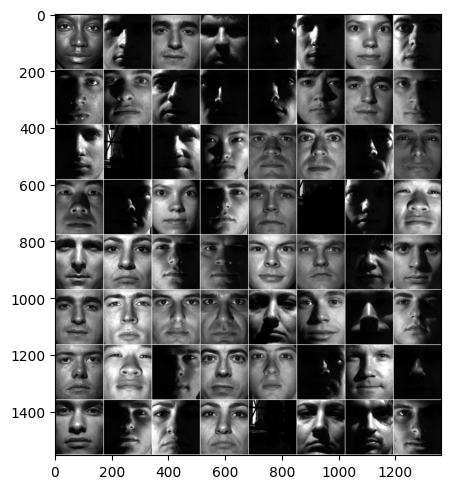
The faces are all front-on and closely cropped, but the lighting varies enormously: from even frontal light, to light from far to one side that leaves half the face in deep shadow, to nearly black images. Telling people apart despite such large changes in lighting is what makes this dataset hard. Two photos of different people under the same light can be more similar, pixel for pixel, than two photos of the same person under different lights. This is exactly the lighting variation that dominated the first principal components of the ORL faces.
We can even do some data augmentation
through the torch transforms available. Here we’ll use ColorJitter to randomly perturb the brightness and contrast in an image each time we load it from our Dataset. Notice in the below I load the very same image 64 times, but it looks a little different each time.
yaleData = ImageFolder(yale_root(),
                       transform=transforms.Compose([
                           transforms.Grayscale(),
                           transforms.Resize((192,168), interpolation=transforms.InterpolationMode.BILINEAR),
                           transforms.ColorJitter(brightness=.5, contrast=.3), # Random recolorization every load.
                           transforms.ToTensor()
                       ]))
# Here, let's view some random faces
samples = torch.stack([yaleData[100][0]
for i in range(64)])
plt.figure(figsize=(5,5))
plt.imshow(make_grid(samples, nrow=8, pad_value=1.0).permute(1,2,0))
plt.tight_layout()Expected output (what the cell above should show, if you can’t run it)
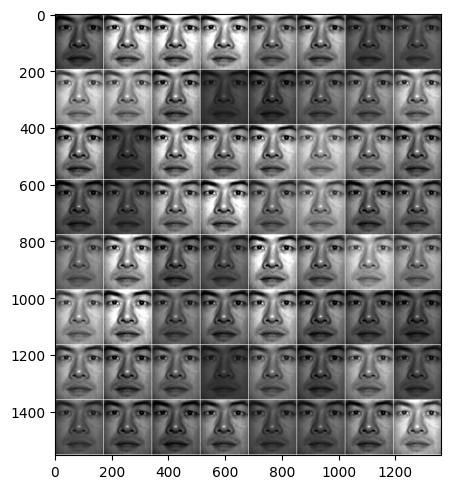
Data augmentation like this effectively gives the network a slightly different version of every training image each epoch. It’s a cheap way to make a small dataset seem bigger, and to teach the network that brightness and contrast changes don’t change who someone is.
We can also randomly split the data into
as many subsets (like training and testing) as we like using torch’s random_split utility. It doesn’t support stratified splits though, so that we likely won’t have equal proportions of the classes/subjects across splits.
Here we’ll do a 90%-10% split, then look at the distribution of classes/subjects in the test set.
train_test_splits = np.round([f*len(yaleData) for f in [.9, .1]]).astype(np.int32)
trainFaces, testFaces = torch.utils.data.random_split(yaleData, train_test_splits.tolist())
import pandas
testlabels = pandas.Series([yaleData.classes[tup[1]] for tup in testFaces])
testlabels.value_counts()Each person has about 65 photos, so a random 10% test split should hold about 6 per person. But as the counts show, some people get noticeably more test images and some fewer. A stratified split, splitting each person’s photos 90/10 separately, would keep the proportions exact.
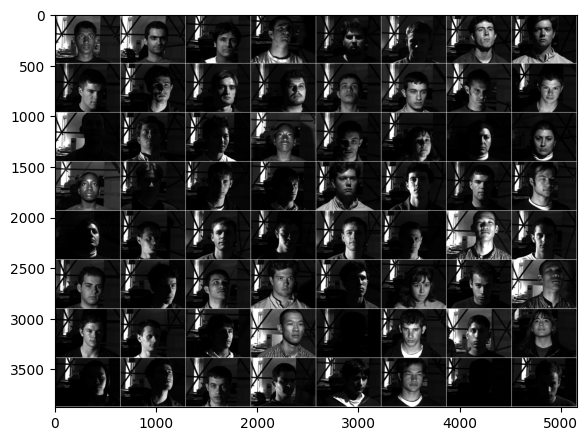
Lastly, here I take a quick look at the Extended
(multiple face orientations and lighting conditions) dataset. This is much larger, with
some 585 images for each of the 38 subjects. Also each image is larger, at 480x640.
The below expects the full dataset in your data folder as ExtendedYaleB (see data_paths and the README). It’s optional: skip this section if you don’t have it.
extData = ImageFolder(yale_ext_root(),
                       transform=transforms.Compose([
                           transforms.Grayscale(),
                           transforms.Resize((480,640)),
                           transforms.ToTensor()
                       ]))
samples = torch.stack([extData[i][0]
for i in np.random.choice(len(extData), 64, replace=False)])
plt.figure(figsize=(6,6))
plt.imshow(make_grid(samples, nrow=8, padding=4,pad_value=1.0).permute(1,2,0))
plt.tight_layout()Expected output (what the cell above should show, if you can’t run it)