stough 202-
Images and videos can be quite large. At 60 frames per second, a 4K Ultra HD movie of 2 hours could require
or about 163 blu-ray discs to store without compression. So clearly compression is a thing.
Compression takes advantage of different kinds of redundancy in the signal. Images in particular have a lot of redundancy. Spatial and Temporal redundancy are characterized by the fact that most pixels are closely related their neighbors. This is due to the fact that any images of human interest are likely to have objects comprised of regions of similar color. Temporal redundancy is the video case, where a pixel over time changes little usually.
Coding redundancy is the one we’re dealing with here. Most images we consider are 3-channel images with 8 bits per pixel per channel. We need 8 bits to represent a value in . Variable-length encoding can take advantage of the differential frequency of certain pixel values over others, encoding more common pixels with fewer bits, and paying for that by using more bits to represent less common pixels.
Compressibility: The degree to which the information in an image or video can be represented using fewer bits. In the example above of the highly compressible 4K Ultra HD, we might say the compression ratio is ~160 (display size over storage size).
Entropy: a measure of the information content in a signal.
signal: here, think of this as seeing each individual pixel in the image in order.
Think of entropy as the surprise, or “unpredictability” of the signal. Each new pixel value in the signal gives you some information,
where is the probability of observing in the signal. For example, if the probability of observing is 1, as in 100% of all the pixels have the value , then there is no information/surpise, or 0 bits, associated with observing it. If , then that’s 1 bit of information. (We won’t consider the symbols that never show up, since observing such a symbol would be infinitely surprising :-).
For our images in the range , we can measure the entropy or information content of the image as
This is just an average of how many bits of information each newly observed pixel gives us, weighted by how likely that pixel value is. is just the normalized histogram values.
In this notebook we’ll explore Huffman variable-length encoding and its effectiveness in some images.
Imports
Notice I’ve added our own custom Huffman utilities huff_utils and scipy.stats.entropy. Study build_huff_tree in particular.
%matplotlib inline
import matplotlib.pyplot as plt
import numpy as np
import matplotlib.colors as mcolors
import skimage.color as color
from ipywidgets import VBox, HBox, FloatLogSlider
from scipy.stats import entropy

# For importing from alternative directory sources
import sys
sys.path.insert(0, '../dip_utils')


from huff_utils import (build_huff_tree,
                        build_huff_encoder,
                        build_huff_pair,
                        load_huffable_image,
                        test_tree_making)
from matrix_utils import (arr_info,
                          make_linmap)
from vis_utils import (vis_rgb_cube,
                       vis_hsv_cube,
                       vis_hists,
                       vis_pair,
                       vis_image,
                       lab_uniform)
Computing Entropy
Ih = load_huffable_image('../dip_pics/happy128.png')loadHuffableImage: input is multi-channel, using grayscale.
loadHuffableImage: Setting range to [0, 255]
arr_info(Ih)((128, 128), dtype('uint8'), np.uint8(0), np.uint8(255))vis_image(Ih, cmap='gray',interpolation='none')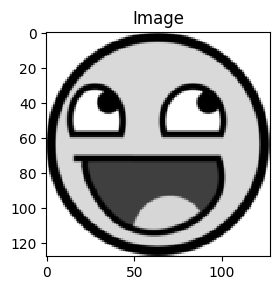
vis_hists(Ih)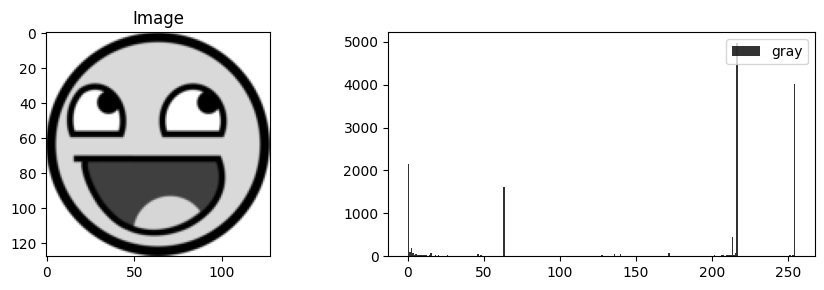
# How many bits would we need?
8*np.prod(Ih.shape)np.int64(131072)bins = np.arange(257)
freq, bins = np.histogram(Ih.ravel(), bins=bins)# What's the average actual information per pixel in the image?
entropy(freq, base=2)np.float64(3.749747928998133)We store this image with 8 bits per pixel, but on average each pixel carries only about 3.75 bits of information. The histogram shows why: a handful of gray levels account for almost all the pixels. So, at least in principle, we should be able to store this image in less than half the space. Entropy is the lower bound on the average bits per pixel that any code can achieve, as long as it treats each pixel independently. Let’s see how close Huffman coding gets.
Huffman Trees
A Huffman tree is a binary tree structure whose leaf nodes represent the symbols in a signal (the pixel values in an image). The path from the root of the tree to a leaf node represents the bit encoding of the associated symbol (0 for left child, 1 for right child, for example). Let’s see an example
test_tree_making()Before heapify...
[node: freq 136: A]
[node: freq 690: B]
[node: freq 754: C]
[node: freq 134: D]
After heapify...
[node: freq 134: D]
[node: freq 136: A]
[node: freq 754: C]
[node: freq 690: B]
Final Huffman tree:
--[node: freq 754: C]
--[node: freq 1714: ]
--[node: freq 134: D]
--[node: freq 270: ]
--[node: freq 136: A]
--[node: freq 960: ]
--[node: freq 690: B]
In the example above we start with pixel values in [‘A’, ‘B’, ‘C’, ‘D’]. The Huffman Tree construction algorithm basically sorts these symbols (image intensities for example) from least to most frequent as a collection of leaf nodes (a minheap is useful for this).
We then take the two least frequent nodes and combine them into one Huffman tree with the two symbols as leaf nodes and the frequency associated with this tree as the sum of the two individual frequencies.
Then insert this tree back into the collection. This is where a heap comes in useful, as a self-maintaining structure always providing access to the least frequent node.
Repeat. Each iteration we end up with one tree fewer in the collection/heap, until there is only one tree left.
The structure of that final tree represents an optimal encoding given the relative frequencies provided.
Variable-length encoding and decoding
See the code in huff_utils. One thing you’ll notice about the encoder is that a lot of pixel values require many more than even 8 bits!!! How could that possibly save space?
encoder, decoder = build_huff_pair(Ih)encoder{np.int64(217): '11',
np.int64(0): '101',
np.int64(23): '10011111111',
np.int64(51): '10011111110',
np.int64(188): '10011111101',
np.int64(158): '100111111001',
np.int64(166): '100111111000',
np.int64(183): '100111110111',
np.int64(92): '100111110110',
np.int64(185): '100111110101',
np.int64(126): '100111110100',
np.int64(176): '10011111001',
np.int64(177): '10011111000',
np.int64(171): '100111101111',
np.int64(175): '100111101110',
np.int64(99): '10011110110',
np.int64(103): '100111101011',
np.int64(218): '100111101010',
np.int64(189): '10011110100',
np.int64(228): '100111100111',
np.int64(117): '100111100110',
np.int64(109): '10011110010',
np.int64(54): '10011110001',
np.int64(250): '10011110000',
np.int64(12): '1001110111',
np.int64(65): '10011101101',
np.int64(66): '10011101100',
np.int64(202): '1001110101',
np.int64(178): '10011101001',
np.int64(90): '100111010001',
np.int64(45): '100111010000',
np.int64(14): '1001110011',
np.int64(219): '100111001011',
np.int64(110): '100111001010',
np.int64(111): '100111001001',
np.int64(224): '100111001000',
np.int64(128): '100111000',
np.int64(215): '100110111',
np.int64(142): '100110110111',
np.int64(155): '100110110110',
np.int64(245): '10011011010',
np.int64(26): '1001101100',
np.int64(172): '10011010',
np.int64(187): '10011001111',
np.int64(191): '10011001110',
np.int64(55): '10011001101',
np.int64(56): '10011001100',
np.int64(41): '10011001011',
np.int64(84): '10011001010',
np.int64(16): '1001100100',
np.int64(153): '10011000111',
np.int64(78): '10011000110',
np.int64(200): '10011000101',
np.int64(102): '10011000100',
np.int64(248): '10011000011',
np.int64(118): '100110000101',
np.int64(129): '100110000100',
np.int64(197): '10011000001',
np.int64(24): '10011000000',
np.int64(170): '10010111111',
np.int64(86): '10010111110',
np.int64(181): '10010111101',
np.int64(91): '10010111100',
np.int64(194): '10010111011',
np.int64(29): '10010111010',
np.int64(107): '10010111001',
np.int64(53): '10010111000',
np.int64(160): '10010110111',
np.int64(80): '10010110110',
np.int64(67): '1001011010',
np.int64(130): '10010110011',
np.int64(122): '10010110010',
np.int64(40): '1001011000',
np.int64(3): '10010101',
np.int64(216): '10010100',
np.int64(4): '100100111',
np.int64(25): '1001001101',
np.int64(68): '10010011001',
np.int64(139): '10010011000',
np.int64(50): '1001001011',
np.int64(105): '10010010101',
np.int64(113): '100100101001',
np.int64(233): '100100101000',
np.int64(17): '1001001001',
np.int64(43): '10010010001',
np.int64(98): '10010010000',
np.int64(173): '1001000111',
np.int64(79): '100100011011',
np.int64(161): '100100011010',
np.int64(157): '10010001100',
np.int64(212): '100100010',
np.int64(162): '10010000111',
np.int64(96): '100100001101',
np.int64(112): '100100001100',
np.int64(27): '1001000010',
np.int64(62): '1001000001',
np.int64(131): '10010000001',
np.int64(133): '10010000000',
np.int64(114): '10001111111',
np.int64(116): '10001111110',
np.int64(100): '1000111110111',
np.int64(222): '1000111110110',
np.int64(74): '100011111010',
np.int64(232): '1000111110011',
np.int64(236): '1000111110010',
np.int64(120): '1000111110001',
np.int64(123): '1000111110000',
np.int64(235): '10001111011',
np.int64(85): '1000111101011',
np.int64(97): '1000111101010',
np.int64(223): '1000111101001',
np.int64(229): '1000111101000',
np.int64(193): '1000111100',
np.int64(21): '1000111011',
np.int64(205): '1000111010',
np.int64(134): '10001110011',
np.int64(135): '10001110010',
np.int64(59): '10001110001',
np.int64(124): '10001110000',
np.int64(46): '10001101',
np.int64(143): '10001100111',
np.int64(184): '100011001101',
np.int64(95): '100011001100',
np.int64(36): '10001100101',
np.int64(151): '100011001001',
np.int64(152): '100011001000',
np.int64(198): '1000110001',
np.int64(186): '1000110000',
np.int64(136): '10001011',
np.int64(253): '1000101011',
np.int64(32): '1000101010',
np.int64(213): '100010100',
np.int64(246): '10001001111',
np.int64(156): '10001001110',
np.int64(35): '1000100110',
np.int64(141): '10001001011',
np.int64(144): '10001001010',
np.int64(94): '10001001001',
np.int64(192): '10001001000',
np.int64(101): '10001000111',
np.int64(52): '10001000110',
np.int64(127): '10001000101',
np.int64(33): '10001000100',
np.int64(154): '10001000011',
np.int64(77): '10001000010',
np.int64(19): '10001000001',
np.int64(164): '10001000000',
np.int64(214): '10000',
np.int64(255): '01',
np.int64(63): '001',
np.int64(249): '000111111111',
np.int64(132): '000111111110',
np.int64(244): '00011111110',
np.int64(13): '0001111110',
np.int64(57): '00011111011',
np.int64(231): '00011111010',
np.int64(106): '00011111001',
np.int64(226): '00011111000',
np.int64(179): '00011110111',
np.int64(180): '00011110110',
np.int64(89): '0001111010',
np.int64(83): '00011110011',
np.int64(87): '00011110010',
np.int64(38): '0001111000',
np.int64(140): '00011101',
np.int64(72): '00011100111',
np.int64(146): '00011100110',
np.int64(148): '00011100101',
np.int64(150): '00011100100',
np.int64(20): '000111000',
np.int64(1): '0001101',
np.int64(7): '000110011',
np.int64(61): '0001100101',
np.int64(243): '00011001001',
np.int64(70): '00011001000',
np.int64(6): '000110001',
np.int64(49): '0001100001',
np.int64(209): '0001100000',
np.int64(8): '000101111',
np.int64(242): '00010111011',
np.int64(227): '000101110101',
np.int64(234): '000101110100',
np.int64(119): '000101110011',
np.int64(121): '000101110010',
np.int64(221): '000101110001',
np.int64(225): '000101110000',
np.int64(230): '00010110111',
np.int64(237): '00010110110',
np.int64(206): '0001011010',
np.int64(167): '00010110011',
np.int64(174): '00010110010',
np.int64(241): '00010110001',
np.int64(145): '000101100001',
np.int64(149): '000101100000',
np.int64(39): '00010101111',
np.int64(81): '00010101110',
np.int64(88): '00010101101',
np.int64(190): '00010101100',
np.int64(58): '0001010101',
np.int64(147): '0001010100',
np.int64(208): '000101001',
np.int64(238): '00010100011',
np.int64(240): '00010100010',
np.int64(104): '00010100001',
np.int64(239): '00010100000',
np.int64(28): '0001001111',
np.int64(22): '0001001110',
np.int64(64): '0001001101',
np.int64(137): '0001001100',
np.int64(5): '00010010',
np.int64(44): '0001000111',
np.int64(203): '0001000110',
np.int64(163): '00010001011',
np.int64(165): '00010001010',
np.int64(182): '0001000100',
np.int64(37): '000100001111',
np.int64(75): '000100001110',
np.int64(108): '000100001101',
np.int64(220): '000100001100',
np.int64(247): '0001000010',
np.int64(11): '000100000',
np.int64(2): '000011',
np.int64(30): '0000101111',
np.int64(76): '0000101110',
np.int64(196): '00001011011',
np.int64(204): '00001011010',
np.int64(60): '0000101100',
np.int64(254): '000010101',
np.int64(10): '000010100',
np.int64(252): '000010011',
np.int64(48): '000010010',
np.int64(73): '00001000111',
np.int64(159): '00001000110',
np.int64(31): '0000100010',
np.int64(71): '0000100001',
np.int64(199): '0000100000',
np.int64(15): '0000011',
np.int64(47): '0000010111',
np.int64(201): '0000010110',
np.int64(195): '0000010101',
np.int64(125): '0000010100',
np.int64(82): '0000010011',
np.int64(168): '0000010010',
np.int64(69): '0000010001',
np.int64(34): '0000010000',
np.int64(169): '0000001111',
np.int64(42): '0000001110',
np.int64(115): '0000001101',
np.int64(251): '0000001100',
np.int64(93): '0000001011',
np.int64(138): '0000001010',
np.int64(18): '000000100',
np.int64(211): '000000011',
np.int64(9): '000000010',
np.int64(210): '000000001',
np.int64(207): '000000000'}decoder{'11': np.int64(217),
'101': np.int64(0),
'10011111111': np.int64(23),
'10011111110': np.int64(51),
'10011111101': np.int64(188),
'100111111001': np.int64(158),
'100111111000': np.int64(166),
'100111110111': np.int64(183),
'100111110110': np.int64(92),
'100111110101': np.int64(185),
'100111110100': np.int64(126),
'10011111001': np.int64(176),
'10011111000': np.int64(177),
'100111101111': np.int64(171),
'100111101110': np.int64(175),
'10011110110': np.int64(99),
'100111101011': np.int64(103),
'100111101010': np.int64(218),
'10011110100': np.int64(189),
'100111100111': np.int64(228),
'100111100110': np.int64(117),
'10011110010': np.int64(109),
'10011110001': np.int64(54),
'10011110000': np.int64(250),
'1001110111': np.int64(12),
'10011101101': np.int64(65),
'10011101100': np.int64(66),
'1001110101': np.int64(202),
'10011101001': np.int64(178),
'100111010001': np.int64(90),
'100111010000': np.int64(45),
'1001110011': np.int64(14),
'100111001011': np.int64(219),
'100111001010': np.int64(110),
'100111001001': np.int64(111),
'100111001000': np.int64(224),
'100111000': np.int64(128),
'100110111': np.int64(215),
'100110110111': np.int64(142),
'100110110110': np.int64(155),
'10011011010': np.int64(245),
'1001101100': np.int64(26),
'10011010': np.int64(172),
'10011001111': np.int64(187),
'10011001110': np.int64(191),
'10011001101': np.int64(55),
'10011001100': np.int64(56),
'10011001011': np.int64(41),
'10011001010': np.int64(84),
'1001100100': np.int64(16),
'10011000111': np.int64(153),
'10011000110': np.int64(78),
'10011000101': np.int64(200),
'10011000100': np.int64(102),
'10011000011': np.int64(248),
'100110000101': np.int64(118),
'100110000100': np.int64(129),
'10011000001': np.int64(197),
'10011000000': np.int64(24),
'10010111111': np.int64(170),
'10010111110': np.int64(86),
'10010111101': np.int64(181),
'10010111100': np.int64(91),
'10010111011': np.int64(194),
'10010111010': np.int64(29),
'10010111001': np.int64(107),
'10010111000': np.int64(53),
'10010110111': np.int64(160),
'10010110110': np.int64(80),
'1001011010': np.int64(67),
'10010110011': np.int64(130),
'10010110010': np.int64(122),
'1001011000': np.int64(40),
'10010101': np.int64(3),
'10010100': np.int64(216),
'100100111': np.int64(4),
'1001001101': np.int64(25),
'10010011001': np.int64(68),
'10010011000': np.int64(139),
'1001001011': np.int64(50),
'10010010101': np.int64(105),
'100100101001': np.int64(113),
'100100101000': np.int64(233),
'1001001001': np.int64(17),
'10010010001': np.int64(43),
'10010010000': np.int64(98),
'1001000111': np.int64(173),
'100100011011': np.int64(79),
'100100011010': np.int64(161),
'10010001100': np.int64(157),
'100100010': np.int64(212),
'10010000111': np.int64(162),
'100100001101': np.int64(96),
'100100001100': np.int64(112),
'1001000010': np.int64(27),
'1001000001': np.int64(62),
'10010000001': np.int64(131),
'10010000000': np.int64(133),
'10001111111': np.int64(114),
'10001111110': np.int64(116),
'1000111110111': np.int64(100),
'1000111110110': np.int64(222),
'100011111010': np.int64(74),
'1000111110011': np.int64(232),
'1000111110010': np.int64(236),
'1000111110001': np.int64(120),
'1000111110000': np.int64(123),
'10001111011': np.int64(235),
'1000111101011': np.int64(85),
'1000111101010': np.int64(97),
'1000111101001': np.int64(223),
'1000111101000': np.int64(229),
'1000111100': np.int64(193),
'1000111011': np.int64(21),
'1000111010': np.int64(205),
'10001110011': np.int64(134),
'10001110010': np.int64(135),
'10001110001': np.int64(59),
'10001110000': np.int64(124),
'10001101': np.int64(46),
'10001100111': np.int64(143),
'100011001101': np.int64(184),
'100011001100': np.int64(95),
'10001100101': np.int64(36),
'100011001001': np.int64(151),
'100011001000': np.int64(152),
'1000110001': np.int64(198),
'1000110000': np.int64(186),
'10001011': np.int64(136),
'1000101011': np.int64(253),
'1000101010': np.int64(32),
'100010100': np.int64(213),
'10001001111': np.int64(246),
'10001001110': np.int64(156),
'1000100110': np.int64(35),
'10001001011': np.int64(141),
'10001001010': np.int64(144),
'10001001001': np.int64(94),
'10001001000': np.int64(192),
'10001000111': np.int64(101),
'10001000110': np.int64(52),
'10001000101': np.int64(127),
'10001000100': np.int64(33),
'10001000011': np.int64(154),
'10001000010': np.int64(77),
'10001000001': np.int64(19),
'10001000000': np.int64(164),
'10000': np.int64(214),
'01': np.int64(255),
'001': np.int64(63),
'000111111111': np.int64(249),
'000111111110': np.int64(132),
'00011111110': np.int64(244),
'0001111110': np.int64(13),
'00011111011': np.int64(57),
'00011111010': np.int64(231),
'00011111001': np.int64(106),
'00011111000': np.int64(226),
'00011110111': np.int64(179),
'00011110110': np.int64(180),
'0001111010': np.int64(89),
'00011110011': np.int64(83),
'00011110010': np.int64(87),
'0001111000': np.int64(38),
'00011101': np.int64(140),
'00011100111': np.int64(72),
'00011100110': np.int64(146),
'00011100101': np.int64(148),
'00011100100': np.int64(150),
'000111000': np.int64(20),
'0001101': np.int64(1),
'000110011': np.int64(7),
'0001100101': np.int64(61),
'00011001001': np.int64(243),
'00011001000': np.int64(70),
'000110001': np.int64(6),
'0001100001': np.int64(49),
'0001100000': np.int64(209),
'000101111': np.int64(8),
'00010111011': np.int64(242),
'000101110101': np.int64(227),
'000101110100': np.int64(234),
'000101110011': np.int64(119),
'000101110010': np.int64(121),
'000101110001': np.int64(221),
'000101110000': np.int64(225),
'00010110111': np.int64(230),
'00010110110': np.int64(237),
'0001011010': np.int64(206),
'00010110011': np.int64(167),
'00010110010': np.int64(174),
'00010110001': np.int64(241),
'000101100001': np.int64(145),
'000101100000': np.int64(149),
'00010101111': np.int64(39),
'00010101110': np.int64(81),
'00010101101': np.int64(88),
'00010101100': np.int64(190),
'0001010101': np.int64(58),
'0001010100': np.int64(147),
'000101001': np.int64(208),
'00010100011': np.int64(238),
'00010100010': np.int64(240),
'00010100001': np.int64(104),
'00010100000': np.int64(239),
'0001001111': np.int64(28),
'0001001110': np.int64(22),
'0001001101': np.int64(64),
'0001001100': np.int64(137),
'00010010': np.int64(5),
'0001000111': np.int64(44),
'0001000110': np.int64(203),
'00010001011': np.int64(163),
'00010001010': np.int64(165),
'0001000100': np.int64(182),
'000100001111': np.int64(37),
'000100001110': np.int64(75),
'000100001101': np.int64(108),
'000100001100': np.int64(220),
'0001000010': np.int64(247),
'000100000': np.int64(11),
'000011': np.int64(2),
'0000101111': np.int64(30),
'0000101110': np.int64(76),
'00001011011': np.int64(196),
'00001011010': np.int64(204),
'0000101100': np.int64(60),
'000010101': np.int64(254),
'000010100': np.int64(10),
'000010011': np.int64(252),
'000010010': np.int64(48),
'00001000111': np.int64(73),
'00001000110': np.int64(159),
'0000100010': np.int64(31),
'0000100001': np.int64(71),
'0000100000': np.int64(199),
'0000011': np.int64(15),
'0000010111': np.int64(47),
'0000010110': np.int64(201),
'0000010101': np.int64(195),
'0000010100': np.int64(125),
'0000010011': np.int64(82),
'0000010010': np.int64(168),
'0000010001': np.int64(69),
'0000010000': np.int64(34),
'0000001111': np.int64(169),
'0000001110': np.int64(42),
'0000001101': np.int64(115),
'0000001100': np.int64(251),
'0000001011': np.int64(93),
'0000001010': np.int64(138),
'000000100': np.int64(18),
'000000011': np.int64(211),
'000000010': np.int64(9),
'000000001': np.int64(210),
'000000000': np.int64(207)}# Let's encode the image.
enI = ''.join([encoder[pix] for pix in Ih.ravel()])len(enI)617718*np.prod(Ih.shape)np.int64(131072)# Compression ratio: old bits to new bits needed.
8*np.prod(Ih.shape)/len(enI)np.float64(2.121901863333927)# Bits per pixel we're actually using; compare to entropy determined above.
len(enI)/np.prod(Ih.shape)np.float64(3.77020263671875)Huffman coding uses about 3.77 bits per pixel, within a few hundredths of a bit of the entropy, for a compression ratio of better than 2. This is no accident. Huffman codes are optimal among all codes that assign each symbol its own whole number of bits, and they always come within 1 bit per symbol of the entropy. Notice also that the rare pixel values that got codes much longer than 8 bits barely matter: they’re so rare that they hardly contribute to the total.
The next three sections are yours. Together they complete the round trip: an image goes in, bits come out, and the same image comes back.
🔨 Your Turn: Decoding
So in the above we see how we can take an image--an array of pixel values--and encode it using the Huffman variable-length encoding. In short:
I = load_huffable_image('../dip_pics/happy128.png')
encoder, decoder = build_huff_pair(I)
enI = ''.join(encoder[pix] for pix in I.ravel())
After the above section executes, enI is the encoded image (a sequence of bits), which can be stored or transmitted more efficiently. However, when display of the image is needed again, we’re going to need to decode the bit sequence back into an array of pixel values. We can use the decoder dictionary to do this.
Task: Write a decode_image function that accepts such an encoded string (like enI) and the decoder dictionary, and outputs a list of intensities equal to the uncompressed image I.ravel(). Show a validation test of this function: is the reconstructed array of intensities equal to the original? See array_equal.
Guidance:
Look at
decoderabove: its keys are bit strings and its values are pixel intensities.The encoded string has no separators between codewords, so the hard part is knowing where one codeword ends and the next begins. Huffman codes are prefix-free: no codeword is the beginning of any other codeword. Think about why that property makes the decoding unambiguous, and use it to decide when you’ve read a complete codeword.
Test on a tiny example you can check by hand first, such as encoding just
Ih.ravel()[:5], before decoding the whole image.Decoding the whole image in plain Python should take at most a few seconds. If yours takes much longer, look for work you repeat for every bit.
🔨 Your Turn: Reconstructing
Task: Now take the output of decode_image to reconstruct the original image I. Show your reconstruction code and a figure supporting its success.
Guidance:
Even though our encoded stream does not include the image shape, you may cheat there and use the original image shape “out of band” so to speak. In practice we could send along the image shape with the encoded stream without too much trouble. See
numpy.reshape.Your decoded list holds Python integers; give the reconstructed array the same datatype as the original (
arr_infoon both).A figure from
vis_pairshows they look the same;np.array_equalshows they are the same. Show both, since lossless compression promises the second.
🔨 Your Turn: In Color
Task: Do this with a color image (that is not happyFace). Perform Huffman compression separately on each of the three channels and show that you can encode, and then decode and reconstruct such a color image. Report the compression ratio for each channel and for the whole image.
Guidance:
Don’t load the image with
load_huffable_image: it converts color images to grayscale (read it inhuff_utils). Useplt.imread, and note that.pngfiles load as floats in while.jpgfiles load asuint8in . Huffman coding needs the integer values.Each channel gets its own
encoder/decoderpair, built from that channel alone. Yourdecode_imagefrom above should work unchanged on each channel.Pick a modest image size, or crop one, so encoding and decoding stay quick: every pixel becomes several characters of a Python string.
Which channel compresses best? Compare each channel’s bits per pixel with its entropy, as we did for the gray image.