stough, 202-
I’ve written put together two utility functions that could be helpful. First is loadvideo, which given a filename uses opencv to read the video file into a numpy array (frames x height x width x 3 color channels) for further evaluation. The second is makeVideo, which takes such an array shape that you might have made yourself and makes a video object that can be displayed in a notebook. See the implementation details in vis_utils.
%matplotlib inline
import matplotlib.pyplot as plt
import numpy as np

# For importing from alternative directory sources
import sys
sys.path.insert(0, '../dip_utils')

from vis_utils import (loadvideo,
                       makeVideo)
vid = loadvideo('../dip_pics/ray_trace.avi')vid.shape(143, 204, 204, 3)A video is just a stack of images. loadvideo gives us a 4D ndarray of shape , of 8-bit unsigned integers. Everything we know about indexing images from the numpy tutorial still applies, with one more axis at the front for time:
vid[0]is the first frame, an ordinary RGB image;vid[:, 100, 200]is the color of one pixel location over the whole video, a array;vid[::10]keeps every tenth frame.
Let’s look at a few frames directly before animating.
which = np.linspace(0, len(vid)-1, 4).astype(int)

f, ax = plt.subplots(1, 4, figsize=(10,2.5))
for a, i in zip(ax, which):
    a.imshow(vid[i])
    a.set_title(f'frame {i}')
    a.set_axis_off()
plt.tight_layout()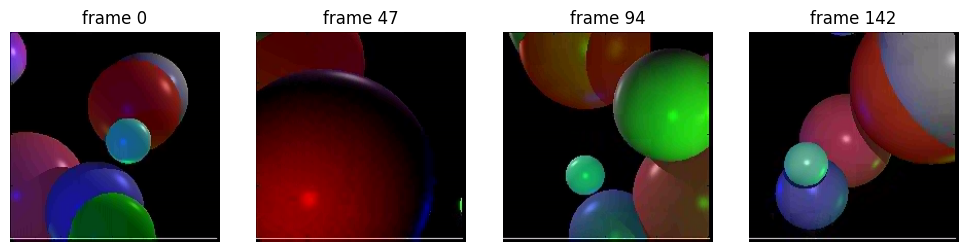
To actually play the video, makeVideo builds a matplotlib FuncAnimation. That’s an object that calls an update function once per frame, swapping the image data with set_array, the same trick we used for sliders in the interactive visualization tutorial. It then renders the whole thing to an HTML/JavaScript player that the notebook can display. The %%capture magic in the next cell keeps the static figure matplotlib creates along the way from also showing up.
%%capture
animatedvideo = makeVideo(vid)
animatedvideo
Neighboring Frames Are Nearly the Same
Watch the video and you’ll notice that very little changes from one frame to the next. We can measure that directly by subtracting each frame from the one after it. (We cast to a signed type first: subtracting uint8s that would go negative wraps around instead.)
diffs = np.diff(vid.astype('int16'), axis=0)  # (frames-1) x h x w x 3

f, ax = plt.subplots(1, 2, figsize=(9,3))
ax[0].imshow(np.abs(diffs[len(diffs)//2]).sum(axis=-1), cmap='gray')
ax[0].set_title('|frame difference|, middle of video')
ax[0].set_axis_off()

ax[1].hist(vid.ravel()[::50], bins=np.arange(0, 257, 4), alpha=.6, label='pixel values')
ax[1].hist(diffs.ravel()[::50], bins=np.arange(-255, 257, 4), alpha=.6, label='frame differences')
ax[1].set_yscale('log')
ax[1].legend()
plt.tight_layout()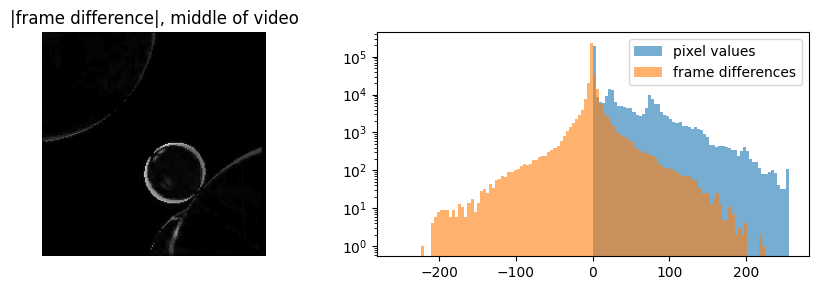
The difference image is mostly black, nonzero only along the edges of things that moved. This scene has a lot of black background, so even the raw pixel values pile up at zero. Still, the frame differences are far more concentrated: more than half of them are exactly zero, and nearly all of the rest are small. This temporal coherence is the time analog of the spatial coherence between neighboring pixels. It’s exactly what video codecs exploit: rather than storing every frame, they store occasional full frames and, in between, mostly the (very compressible) differences. We’ll make this idea precise with entropy and predictive coding.