stough 202-
DIP 8.9
In this activity we’re going to synthesize a bit of the JPEG encoding standard, specifically block transform encoding and zonal coding quantization. We will look to understand how the quantization affects the image reconstruction.
Read up in DIP 8.9 or elsewhere if needed.
Imports
We’re going to take advantage of both view_as_blocks and the Discrete Cosine transform for this.
%matplotlib inline
import matplotlib.pyplot as plt
import numpy as np

# For importing from alternative directory sources
import sys
sys.path.insert(0, '../dip_utils')

from matrix_utils import (arr_info,
                          make_linmap)
from vis_utils import (vis_rgb_cube,
                       vis_hists,
                       vis_pair,
                       vis_triple,
                       vis_surface)

from wavelet_utils import (make_haar_matrix,
                           make_random_basis,
                           make_klt_basis,
                           make_dct_matrix,
                           make_standard_matrix,
                           vis_blocks)

from skimage.util import view_as_blocks
from skimage.util import montage
from skimage.transform import resize, rescale
JPEG Compression
Critically, this requires you look at and understand the block_viewing_demo. There we do some kind of processing on block-by-block, and even reconstruct.
Basically
Take the image in form and subtract 128. This is to center around 0. Make sure you change the
dtypewhen you do this, or else you won’t be able to represent negatives.Transform each 8x8 block using the DCT transform matrix (see
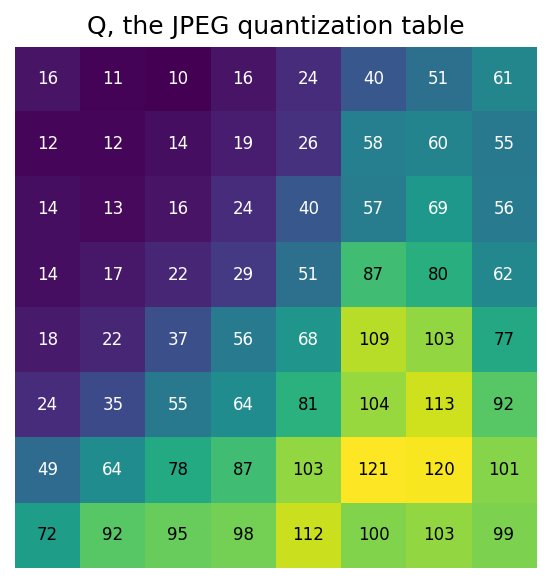
make_dct_matrix, and even see how we did this transform in the basis_decomp_64pix demo).Quantize the transform coefficients according the Q matrix. This is, divide the block coefficients and store the result in integer form.
These quantized transform blocks represent how the compressed image would be stored or transmitted. We won’t go further than just having this representation, as the point of the exercise is to understand how this quantization affects the reconstruction.
Reconstruction: for each transform block, remultiply according to the Q matrix and then invert the transform process (including add back 128), to reconstruct the as-though-compressed image block.
We’ll define the Q matrix, so you don’t have to transcribe it yourself.
Q = np.array([[16, 11, 10, 16, 24, 40, 51, 61],
              [12, 12, 14, 19, 26, 58, 60, 55],
              [14, 13, 16, 24, 40, 57, 69, 56],
              [14, 17, 22, 29, 51, 87, 80, 62],
              [18, 22, 37, 56, 68, 109, 103, 77],
              [24, 35, 55, 64, 81, 104, 113, 92],
              [49, 64, 78, 87, 103, 121, 120, 101],
              [72, 92, 95, 98, 112, 100, 103, 99]])
Exercise: Interactive Quantization Demo
Put together an interactive demo that shows the original image, its current reconstruction, and a view of the currently quantized transform coefficients. This demo should then interact with a FloatSlider that affects the multiple applied to the Q quantization matrix. This demo would show how you could increase the compression (increasing the multiple) and what that increased compression would do to the image reconstruction. You might have the slider start at at the low end, maybe 5 at the high end, to provide a good range from very little quantization to a lot.